How to Block Reddit on iPhone (App, Website, iOS 27)
Reddit has no screen time limit of its own. How to block Reddit on iPhone, iOS 27 included: the app, reddit.com, old.reddit.com and the loophole most miss.
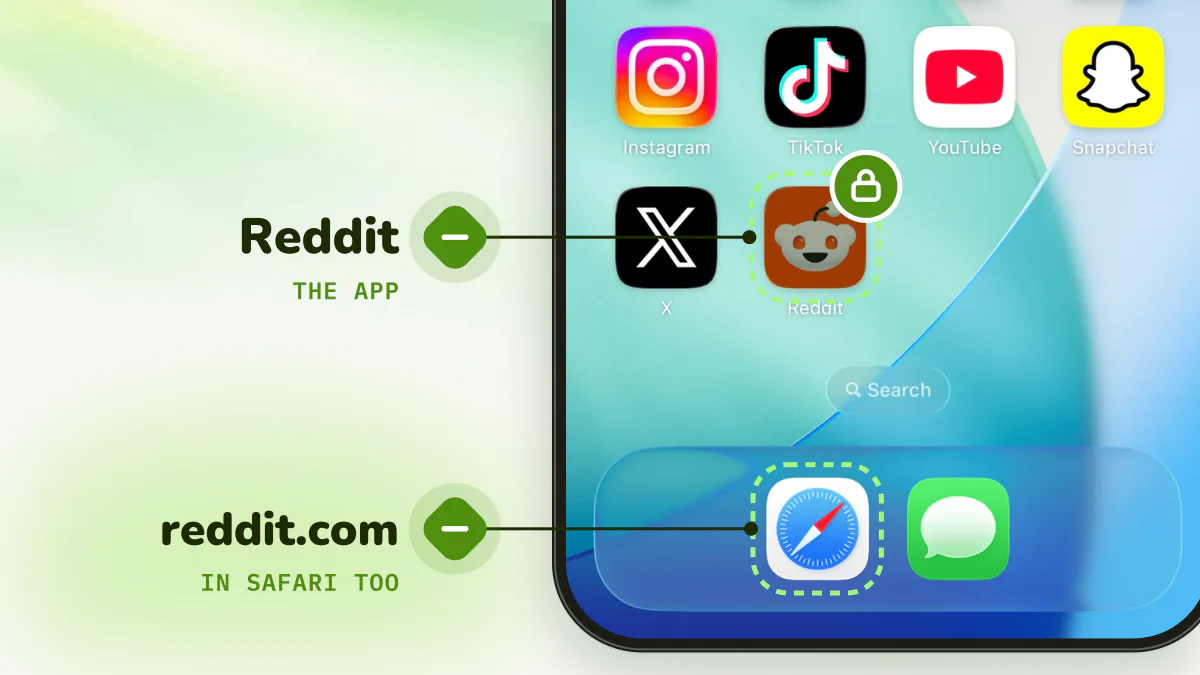
To block Reddit on iPhone, put a Screen Time limit on the app and block reddit.com and old.reddit.com in Safari. The website matters as much as the app, because Reddit works perfectly in a browser and Google sends you there all day. If you use Reddit for answers, limit long sessions instead of banning it.
Check your version in Settings > General > About. On iOS 27, App Limits are now Time Allowances (Settings > Screen Time > Time Allowances), and Downtime is now Screen Time Schedule.
Quick answer
- iOS 27: Time Allowances, a low allowance on Reddit's category, locked under Manage Screen Time > Lock Screen Time Settings.
- iOS 16 to 26: Settings > Screen Time > App Limits > Add Limit > Reddit, Block at End of Limit on.
- Browser: reddit.com and old.reddit.com blocked.
- Keep the answers, lose the rabbit hole: a session limit on app and site together.
Why is Reddit so hard to put down?
Because it doesn't feel like doomscrolling. You're reading, you're learning, the comments are funny. Then it's 1 a.m. and you're three subreddits deep in a stranger's wedding drama.
The hook is variety. The home feed mixes every interest you have, comment threads nest forever, and each links to another. Text feels productive in a way video doesn't, which makes "ten more minutes" easy to justify.
How do I block Reddit on iOS 27?
iOS 27 (September 2026) replaced App Limits with Time Allowances, set by category (Apple's examples: Entertainment, Games, Social Media) rather than app by app.
- Open Settings > Screen Time > Time Allowances. If asked, turn on App & Website Activity.
- Tap the category Reddit belongs to and drag its slider down. Apps work until they hit "either the category's allowance or the daily total".
- To limit Reddit alone, tap Manage Categories > + and create a category for it. Apple documents creating categories but not a one-app category, so treat this as a likely route rather than a promise.
- Keep Reddit off Always Allowed.
- Lock it: Manage Screen Time > Lock Screen Time Settings.
Late nights are Reddit's strongest window. In Screen Time Schedule, turn on Schedule, Add Schedule from 11:00 p.m., and leave Reddit's category out of what that window allows.
Apple doesn't document what the limit screen offers on your own phone. Early hands-on reports say Ignore Limit is still there and asks for the passcode.
How do you block the Reddit app on iOS 16 to 26?
- Open Settings > Screen Time and turn it on if needed.
- Tap App Limits > Add Limit.
- Find Reddit and select it.
- Pick a time: 1 minute for a near-total block, around 20 minutes for a cap.
- Turn on Block at End of Limit. This needs a Screen Time passcode (Settings > Screen Time > Lock Screen Time Settings, or Use Screen Time Passcode on iOS 16).
Without the passcode, you just get Ignore Limit. See how to remove "Ignore Limit".
For nights, set Downtime (Settings > Screen Time > Downtime > Scheduled) from 11:00 p.m. and keep Reddit off Always Allowed.
How do you block Reddit in Safari?
This is the loophole most guides forget. Block the app and you'll simply open reddit.com. On iOS 16 to 26:
- Settings > Screen Time > Content & Privacy Restrictions, and turn it on.
- App Store, Media, Web & Games > Web Content > Limit Adult Websites (on iOS 16 to 18.0, the first menu is Content Restrictions or Store, Web, Siri & Game Center Content).
- Under Never Allow, add reddit.com and old.reddit.com.
It's all or nothing, and Reddit links in Google results get blocked too, which can get in the way of real research.
On iOS 27, Apple's guide for your own iPhone doesn't document a website block list. Look for Apps & Websites in Screen Time; otherwise check Content & Privacy Restrictions for the Web Content screen. An allowance covers an app's website only if the app declares it, so test reddit.com yourself. More in how to block websites on iPhone.
What can you change inside Reddit?
Reddit has no daily limit, break reminder or quiet mode. You can still shrink the pull:
- Turn off most notifications in Settings > Notifications, especially trending posts and recommendations.
- Leave the subreddits you doomscroll. Fewer subscriptions, a less bottomless home feed.
- Turn off video autoplay in Settings.
A Face ID lock (long-press the icon, Require Face ID) stops other people, not you.
Why don't these blocks hold?
Reddit is the easiest app to route around. Block the app and you use Safari; block Safari and a search result links you straight into a thread. Every built-in block can also be undone by you: "Ignore Limit", your own passcode, a switch in Settings. See Screen Time loopholes.
And a daily limit is the wrong shape. Many Reddit visits are genuinely useful: you searched for an answer and the best one was in a thread. The problem is the session that starts there and wanders.
How do you block Reddit so it holds?
Detox (iPhone and iPad) fits Reddit's shape: quick answers in, rabbit holes out.
- Put the Reddit app, reddit.com and old.reddit.com in one Detox rule. App and browser share the same count.
- Set a session limit, say 20 minutes in a row. Opening a thread from Google and reading the answer is fine. Once you have scrolled continuously past your limit, Reddit locks for a short break.
- Let it reset. A couple of minutes away and the count goes back to zero.
- Add a schedule to shut Reddit every night after 11 p.m.
- Turn on Strict mode so you can't edit or delete the rule at 1 a.m. An urgent unblock covers real emergencies, once every 24 hours.
It's iOS only and paid, with a free trial.
The bottom line
Limit the app (Time Allowances on iOS 27, App Limits on iOS 16 to 26), and just as important, block reddit.com and old.reddit.com, since Reddit works so well in Safari. Turn off its recommendation notifications too. If Reddit is your research tool but also your 1 a.m. habit, limit continuous sessions rather than blocking it outright.
Related: How to block X (Twitter) on iPhone · Doomscrolling: why we do it and how to stop · How to block apps on iPhone: every method ranked
Frequently asked questions
Does Reddit have a screen time limit?
No. Reddit has no daily limit or break reminder. You need Screen Time or a blocker.
How do I block Reddit on iPhone?
On iOS 16 to 26: Settings > Screen Time > App Limits > Add Limit, select Reddit, choose a time and turn on Block at End of Limit. Then add reddit.com and old.reddit.com under Content & Privacy Restrictions > App Store, Media, Web & Games > Web Content > Never Allow.
How do I block Reddit on iOS 27?
App Limits are now Time Allowances: Settings > Screen Time > Time Allowances. Lower the allowance on Reddit's category, or create a category for it under Manage Categories, and lock it under Manage Screen Time > Lock Screen Time Settings. Apple doesn't document whether a category can hold just one app, so check what's in it.
Can I block Reddit but still see Reddit answers in Google?
Not with a full website block; links from search get blocked too. A session limit fits better: reading one thread is fine, and only a long continuous session triggers the block.
What's the most reliable way to block Reddit on iPhone?
An app limit with a passcode someone else holds, plus the website block. Without relying on someone else, Detox locks Reddit once you've scrolled continuously past your limit, and strict mode stops you from editing the rule.